The full changelog for Ikuna, the focus intelligence and context manager for macOS. Full notes for every 1.x release, and a short history of the early 0.x builds.
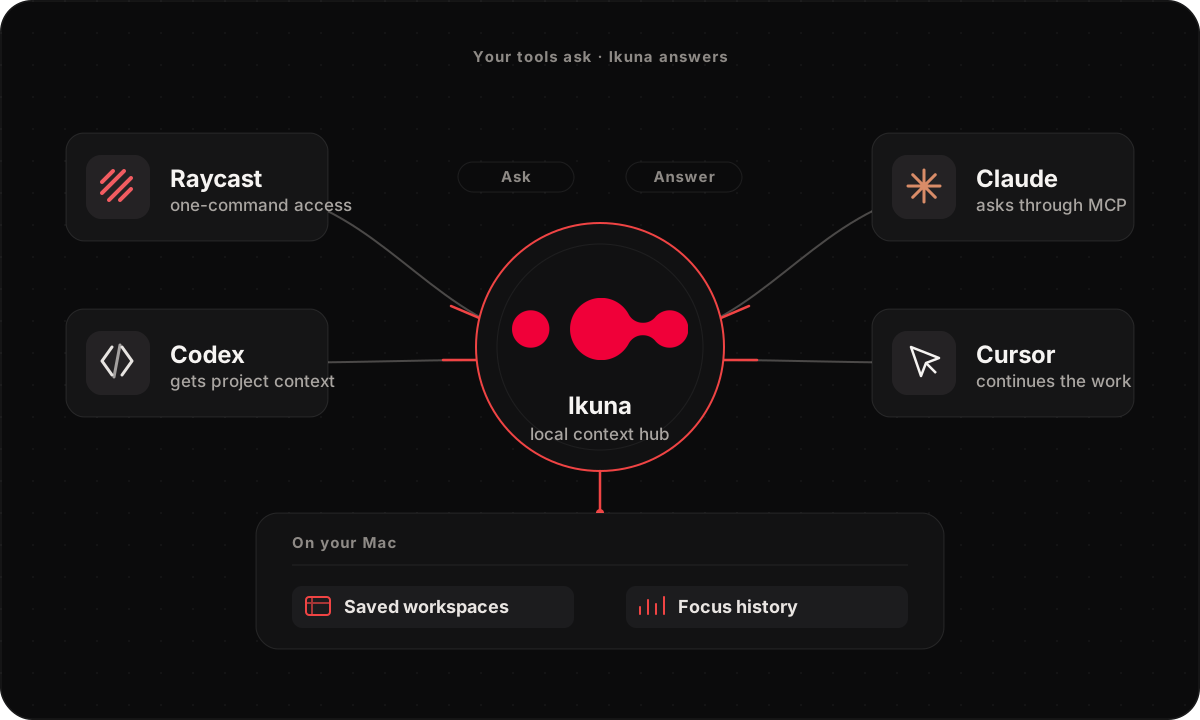
Connect Claude, Codex, Claude Code, or Cursor to your real work context with one command, guided setup and repair, and a Raycast extension coming to the Raycast Store for Ikuna Today and workspace control from the keyboard.
Connect Ikuna to Claude Desktop and Codex over MCP, with per-capability permission and privacy controls. Plus workspace-scoped Focus Shield exceptions.
Manually assigned per-window Chromium browser profiles, an adaptive productivity baseline for each Ikuna, heartbeat-based activity tracking, and a faster Dashboard.
Added the Extra tab: play a Spotify playlist, change the wallpaper, and clean the space when you start an Ikuna. Clean Workspace became Ikuna-specific, plus bug fixes.
Added the first dashboard for activity and context switches with a customizable time interval, and a Context Switches menubar widget for a quick daily overview.
Added the Workspace Manager for editing saved apps, an AppMover to relocate Ikuna to Applications, an experimental context-switch counter, and keyboard selection of Ikunas with ⌘+§.
Added the Clean button to hide all apps, Advanced Cleaning in the menubar to close everything except Ikuna, per-space cover images, Advanced Creation, and Google Analytics for anonymous usage.
Advanced creation MVP: choose a video teaser and/or a soundtrack for an Ikuna space to build an automatic behavior and state of mind, plus UX polish and bug fixes.
The first release: save your apps and their positions as a space and restore them in one click (up to 4), launch at login, a global ⌘+§ shortcut, per-Ikuna shell/AppleScript automation, custom covers, and auto-update.
Ikuna 1.2.6 is the developer release. One npx command connects the AI tools you already use to Ikuna's local record of how you actually worked: sessions, focus blocks, and context switches, answered from data that stays on your Mac. A guided setup configures and repairs each client for you, and a new extension is coming to the Raycast Store, with Ikuna Today, workspace switching, and saving from the keyboard. MCP stays optional: everything in Ikuna works without it.
One command connects your AI tools
Run npx -y ikuna-mcp and Claude Desktop, Codex, Claude Code, or Cursor can ask Ikuna about your real work: what you worked on, for how long, and where your attention went.
Guided setup finds each client's config and writes it for you with npx ikuna-mcp setup, backs up the old one, and verifies the connection live. Already set up? setup --repair finds and fixes what broke.
Ikuna is listed on npm and the official MCP Registry, so install and updates stay one command, with nothing new to host.
MCP stays optional. Ikuna works fully without it; the connection is there when your tools need your context.
Raycast: coming to the Raycast Store
The upcoming extension will show today's Focus Score, the day's key numbers, and a 7-day trend, without opening the Dashboard.
It will let you switch, edit, save, reopen, or exit an Ikuna straight from Raycast, plus jump into Focus Intelligence.
The extension talks to Ikuna through the same signed local MCP bridge, so nothing new gets access to your data.
MCP answers get sharper
Tools resolve an Ikuna by its exact identity, so a question about a specific workspace hits the right one.
A timestamp-bounded raw activity export gives your agent a finer cut of the day when a summary is not enough.
Read calls work with stricter MCP clients, so fewer 'works in one tool, fails in another' surprises.
Steadier where it counts
An Opera or Chrome restore that times out, or gets replaced by a new switch, now stops cleanly instead of fighting the next one.
Deep work survives a short idle break, and sleep ends a session cleanly instead of leaving a gap.
Active Time and context-switch counts agree everywhere you see them: Dashboard, reports, and MCP.
Workspace wallpaper activates reliably across multiple displays and follows you across machines.
Ikuna 1.2.5 build 81 adds full Zed Editor support. Saving a workspace now captures Zed project roots, open files, and editor tabs, and restore brings them back with the rest of the workspace. The same build takes AI Connections out of beta, restores Opera and Firefox with your workspace, and ships a round of workspace switching polish.
Zed Editor support
Save and restore Zed as part of a workspace: project roots, open files, and editor tabs are preserved and come back on restore.
Zed sits alongside the editors and terminals Ikuna already restores, so a Zed-based setup survives a full workspace switch.
AI Connections, out of beta
MCP support for Claude Desktop, Codex, and local MCP clients is ready for everyday use.
Ikuna MCP 0.1.1 is listed in the official MCP Registry as io.github.RobertoHanas/ikuna-mcp, distributed through npm and run locally over stdio with npx -y ikuna-mcp.
Free 7-day rolling history: ask week-level questions on the Dashboard or over MCP without a subscription.
Opera and Firefox restore
Opera and Firefox windows restore as part of a workspace, alongside Chrome, Safari, and the rest of the Chromium family.
Workspace switching polish
More accurate window matching on restore, better iTerm session handling, correct hidden-app state, and quick-edit fixes.
Ikuna 1.2.5 takes AI Connections out of beta and pairs it with a free 7-day rolling history on the Dashboard and over MCP. That means you can ask Claude, Codex, or a local MCP client how your week actually went, where your attention went, and how you behave when work gets messy, without buying Pro first. Opera and Firefox workspace restore also lands for the first time. Most competitors still stop at Chromium. Ikuna can bring those browsers back with your workspace too.
AI Connections is out of beta
MCP support for Claude Desktop, Codex, and local clients is ready for everyday use.
Connect once, keep control over what each client can see and do.
Ask for a week review, a standup from your workday, or a plain-language read on how you switch and focus.
Connections stay healthier across a normal day: clearer Connected status, less nagging once you have dismissed a prompt, and a clear ask to open Ikuna when a tool needs the app running.
Free 7-day rolling history for Dashboard and MCP
Free use now keeps a full recent week of history you can open in the Dashboard or query through MCP.
Dashboard charts and totals cover that rolling window without a subscription.
MCP can answer week-level questions on that same free window.
Going further back is a clear Pro moment, not a broken chart or a silent failure.
Opera and Firefox restore (first time)
Ikuna can restore Opera and Firefox as part of a workspace, alongside Chrome, Safari, and the rest of the Chromium family.
Fewer duplicate windows and less layout drift when those browsers are part of an Ikuna.
A real differentiator: most context tools still do not restore Opera or Firefox with your project.
Also in 1.2.5
Stronger restore and switching overall: iTerm sessions (including live jobs), careful Finder restore, clearer transition progress, quieter menu bar after a switch.
Deep work sessions that survive real life: automatic endings wait and confirm, so a short blip does not wipe a real focus block.
Simpler Focus Intelligence: clearer coaching, Day Signal for today, Week and Month trends on Pro, optional bring-your-own OpenAI or Anthropic keys.
Settings and privacy polish: easier to read, clearer Pro, full analytics opt-out, smoother onboarding including Start at Login, faster Dashboard with more trustworthy Active Time.
Ikuna 1.2.4 introduces a new way to work with your productivity data: AI Connections. You can connect Ikuna to supported AI clients through the Model Context Protocol (MCP), including Codex and Claude Desktop, and ask questions about your workday, your focus patterns, and your saved workspaces while keeping control over exactly what a client can access. It is not about sending your workday somewhere else; it is about using your own local Ikuna context with the AI tools you choose, on terms you set.
AI Connections: Ikuna meets your AI tools
Ikuna connects to Codex and Claude Desktop through a built-in, local MCP helper.
Ask things like “What did I actually work on today?”, “Where did my time go this week?”, “What were my biggest context switches?”, “Help me plan a focused afternoon”, or “Give me a standup from my workday.”
Permissioned access to today’s activity summary, activity timelines and focus blocks, historical reports and period comparisons, saved workspaces, and the currently active workspace.
Permissioned actions: starting, stopping, saving, creating or editing an Ikuna, opening the Dashboard, and Focus Shield controls for Pro users.
Privacy and permission controls
AI Connections are opt-in. Each capability can be set to Always allow, Needs approval, or Blocked.
Choose what sensitive context is shared: hide web addresses entirely, share domains only without full paths or query parameters, or share full URLs when you want that context available.
Hide window titles, which may contain project, document, or file names.
A local access audit shows when a connected client used an Ikuna capability.
One-click setup for supported clients
From Settings, Ikuna can add its own MCP connection to Codex or Claude Desktop while preserving other MCP servers you already use.
It backs up the configuration first and never replaces an existing Ikuna connection that points somewhere else.
More control over Focus Shield
Add app exceptions and website-domain exceptions directly from Settings.
Save exceptions globally or only for one Ikuna, and move them between global and workspace-specific scope.
Review saved exceptions per Ikuna and customize shielded categories for individual workspaces.
Mark an app or domain productive directly from a Focus Shield intervention.
Better first-workspace setup and continuity
Live app detection while creating your first workspace, plus workspace presets and a confirmation before capturing it.
Dashboard now follows the current day across midnight.
Fixed a sync issue that could cause deleted workspaces to reappear.
Added report and return reminders and clearer support links in Settings.
Ongoing browser restoration work
Continued reliability work on browser restoration across Firefox, Opera, Chrome, and Chromium-based browsers: fewer misplaced windows, safer tab recovery, less manual rebuilding.
1.2.3 focuses on real-time productivity data and the reliability of context-switch tracking, and adds product analytics through a PostHog integration.
Focus Shield & preferences
Added a Focus Shield settings view and updated configurable focus preferences.
Refactored the deep-work session helper to improve continuous deep-work tracking and distraction-overlay behavior.
Updated release feeds (appcast.xml / appcast-dev.xml) and bumped the app version to 1.2.3.
Live dashboard & real-time productivity engine
Consolidated dashboard counters to sync against a single clock timer for seamless real-time updates.
Restored immediate counter updates so there is no delay when active time changes.
Fixed break-total calculation bugs and ensured deep-work sessions resume cleanly using the frontmost application after a break ends.
Stabilized report rendering and snapshot updates whenever live productivity data changes.
Tracking & context-switch reliability
Fixed an issue where rapidly switching between apps while resolving browser tab URLs via AppleScript caused context switches to be dropped.
Replaced single-flight drops with FIFO event queues so all rapid context switches are preserved and processed sequentially.
Product analytics (PostHog integration)
Added 5-minute PostHog heartbeats, app-update detection, and shared version/build tracking.
Instrumented deep-work lifecycles, Pro trial and feature usage, break outcomes, item creation/deletion, permission changes, AI coach interactions, and research triggers.
Debounced rapid duplicate audio event tracking within a 3-second window while retaining playback/record looping metadata.
Everything new in Ikuna since 1.1.0: more intelligent workspaces, browser-profile support, rebuilt activity tracking, a faster Dashboard, and stronger systems protecting your work and account.
Browser profiles for every Ikuna
Assign a specific Chromium browser profile to each browser window in an Ikuna, by hand, in the workspace editor's Advanced view (the default is the current profile). Supported: Google Chrome, Chromium, Brave, Microsoft Edge, Opera, and Vivaldi.
The correct profile opens before an Ikuna’s windows and tabs are restored, keeping personal, client, company, and project browsing separate.
When switching workspaces, Ikuna only closes browser windows it can confidently associate with the outgoing Ikuna. Unrelated windows are left untouched.
Profile discovery uses local profile names and identifiers only. Ikuna does not read browsing history, cookies, passwords, or account content.
Productivity insights that adapt to each workspace
Ikuna now builds a productivity baseline for each workspace and gradually learns how that Ikuna is normally used.
The adaptive model considers the applications, activity patterns, focus sessions, and context-switching behavior of each Ikuna, without letting temporary behavior distort the baseline.
Unified scoring thresholds across the Dashboard, coaching, and reports so the same activity is interpreted consistently.
More accurate activity tracking
Rebuilt time tracking around recorded activity heartbeats instead of extending activity across assumed five-minute windows.
Idle breaks are closed correctly when activity resumes and can no longer overlap later activity.
More accurate active-time totals, idle-time calculations, Deep Work totals, productivity scores, and context-switch summaries.
Fixed double-counting of an ongoing Deep Work session and incorrect app-level productivity classification inside individual Ikunas.
More meaningful context-switch reporting
The Dashboard now uses filtered context-switch counts for its main summaries, separating meaningful switches from raw diagnostic events.
Underlying diagnostic information is retained for troubleshooting.
Context-switch collection is hardened to recover when macOS tracking services become temporarily unavailable.
A faster and more reliable Dashboard
Reduced CPU usage, stopped repeating XPC reconnection loops, improved cached-data behavior, and fixed background-thread issues that made widgets unstable.
Fixed a migration problem that could crash the Dashboard when upgrading from an older install.
Working Hours settings behave consistently across graphs, and calendar-aware week and month calculations are more reliable.
Tracking health, easier to understand
Clearer feedback about whether activity tracking is working and whether the required macOS permissions are available.
Added a diagnostics snapshot to help identify tracking problems.
Deep Work tracking can detect and repair inconsistent state automatically while respecting a decision to stop tracking. Ikuna no longer silently re-enables tracking while checking Accessibility permissions.
Safer workspace switching
Fixed a timing issue that could let Clean Workspace begin before the outgoing Ikuna finished saving.
Switching now waits for the current workspace state to be safely persisted before cleaning or restoring the next environment.
Workspace names are validated before filesystem operations, preventing unsafe or unexpected paths.
Stronger account, license, and billing protection
Checkout tokens are now transactionally single-use; entitlement updates are protected against webhook replays and out-of-order events.
Backup license keys can only be connected to one account.
License validation responses expose less identity information and include stronger authentication, input validation, and abuse protection.
Removed an obsolete checkout endpoint.
A better first week with Ikuna
A more helpful first-week onboarding journey built around meaningful product milestones, introducing features when they are most useful and linking into the app with web fallbacks.
Reliable delivery monitoring, retries, staged rollout controls, consent management, unsubscribe support, and suppression rules. Lifecycle and delivery data is protected from untrusted clients.
Smaller improvements throughout
Refinements to Dashboard headers and presets, coaching messages and focus-score presentation, workspace switching, cached Dashboard states, calendar calculations, tracking recovery, permission readiness, and release validation.
If 1.0.0 introduced the core Ikuna experience, 1.1.0 is where it starts to feel complete: more dependable workspace restoration, a much richer Dashboard, smoother switching and onboarding, iCloud sync across Macs, and stronger security and recovery foundations.
More reliable workspace restore and switching
Better restoration for Chrome, Arc, and other Chromium-based browsers, and better Finder and iTerm behavior.
Improved Spotify launch behavior during workspace switching and more robust multi-monitor window positioning.
Better cleanup when switching workspaces and safer handling of malformed or incomplete tab and window data.
A faster, more useful Dashboard
Faster loading and cache handling; fixes for month-view freezes and lag; Live Active Time restored.
Better graph scaling and empty-state behavior, more accurate week and month totals, better deep-work attribution inside Ikuna workspaces.
Better counters for hours worked, breaks, productivity split, and context switches.
New insight layers: Attention Span tracking, focus and energy flow indicators, historical AI briefings through the Performance Journal, more polished AI summaries and action-oriented coaching.
Better onboarding and first-run flow
Overhauled onboarding UI with clearer permission prompting and a better explanation of shortcuts and setup.
Better Pro Preview entry points.
Quick Switcher is gated until onboarding completes, avoiding confusing first-run interruptions.
Quick Switcher improvements
Optional “open Quick Switcher on launch” setting.
Better Enter key behavior and workspace selection flow.
Improved layout and centering on the active display.
Better workspace editing and transition feedback
Inline tab insertion inside window rows and better browser and Finder tab mapping.
Cleaner editor behavior with fewer accidental app launches and more reliable Create/Edit panel behavior.
Progress feedback while Ikuna is cleaning or loading a workspace.
Stronger iCloud sync and recovery
Granular iCloud sync controls and better CloudKit transaction handling.
Better merge behavior for workspaces and dashboard-related data, and better cache invalidation during sync.
Support for CloudKit sync on existing on-disk SQLite stores and better startup auth restoration for iCloud flows.
Hardened local backup and restore behavior for data safety.
Stronger security foundations
Better keychain access isolation and fewer unnecessary auth and keychain prompts at startup.
Safer account bootstrap behavior.
Audit logging and enterprise data-isolation groundwork, plus additional hardening across persistence, sync, and account flows.
Clearer telemetry handling
More consistent analytics identity and opt-out handling and better separation between diagnostics and other telemetry flows.
Optional anonymized productivity research flow.
Redaction for Chrome and Arc incognito tabs and URLs.
Ikuna is a workspace manager for macOS: you save your entire app and window layout as a workspace and restore it in one click. v1.0 makes the core experience rock-solid for everyone and adds deeper tools for power users who want more control over their focus and workflow.
Free forever Core + Ikuna Pro
Ikuna Core stays free forever: workspace saving and launching, up to 4 workspaces, video triggers, audio triggers, AppleScript automation, and the original dashboard (deep work hours, context switches, activity/breaks, timeline graph).
Early adopters get a Legacy tier: everything currently in Pro, granted automatically.
Ikuna Pro adds deeper customization and analytics that will keep growing.
Focus Shield (Pro)
When you slip out of deep work into a distraction app, Focus Shield activates and asks whether you meant to.
Customize which apps trigger it, set sensitivity thresholds, and choose how aggressive the nudge is. It is a mirror, not a hard blocker.
Device Link (Pro)
Link a workspace to a specific display setup. Plug in and Ikuna detects the device and auto-launches the linked workspace; disconnect and it closes cleanly.
Pro Dashboard (Pro)
App Taxonomy: see which apps are eating your focus and which are helping.
Productivity Split & Category Split: break time down by productive vs. unproductive across app categories.
Weekly and monthly analysis to spot patterns over time.
What's next
Pomodoro integration, tying structured focus sessions directly into workspace launches and Focus Shield.
Added the Extra tab: play a Spotify playlist, change the wallpaper, and clean the space when you start an Ikuna. Clean Workspace became Ikuna-specific, plus bug fixes.
Added the first dashboard for activity and context switches with a customizable time interval, and a Context Switches menubar widget for a quick daily overview.
Added the Workspace Manager for editing saved apps, an AppMover to relocate Ikuna to Applications, an experimental context-switch counter, and keyboard selection of Ikunas with ⌘+§.
Added the Clean button to hide all apps, Advanced Cleaning in the menubar to close everything except Ikuna, per-space cover images, Advanced Creation, and Google Analytics for anonymous usage.
Advanced creation MVP: choose a video teaser and/or a soundtrack for an Ikuna space to build an automatic behavior and state of mind, plus UX polish and bug fixes.
The first release: save your apps and their positions as a space and restore them in one click (up to 4), launch at login, a global ⌘+§ shortcut, per-Ikuna shell/AppleScript automation, custom covers, and auto-update.
Ikuna is built by Brainsoft Oy in Oulu, Finland. Release notes are also published at the product site. macOS 13+ · Apple Silicon & Intel.
 Ikuna
Ikuna