 Ikuna
Ikuna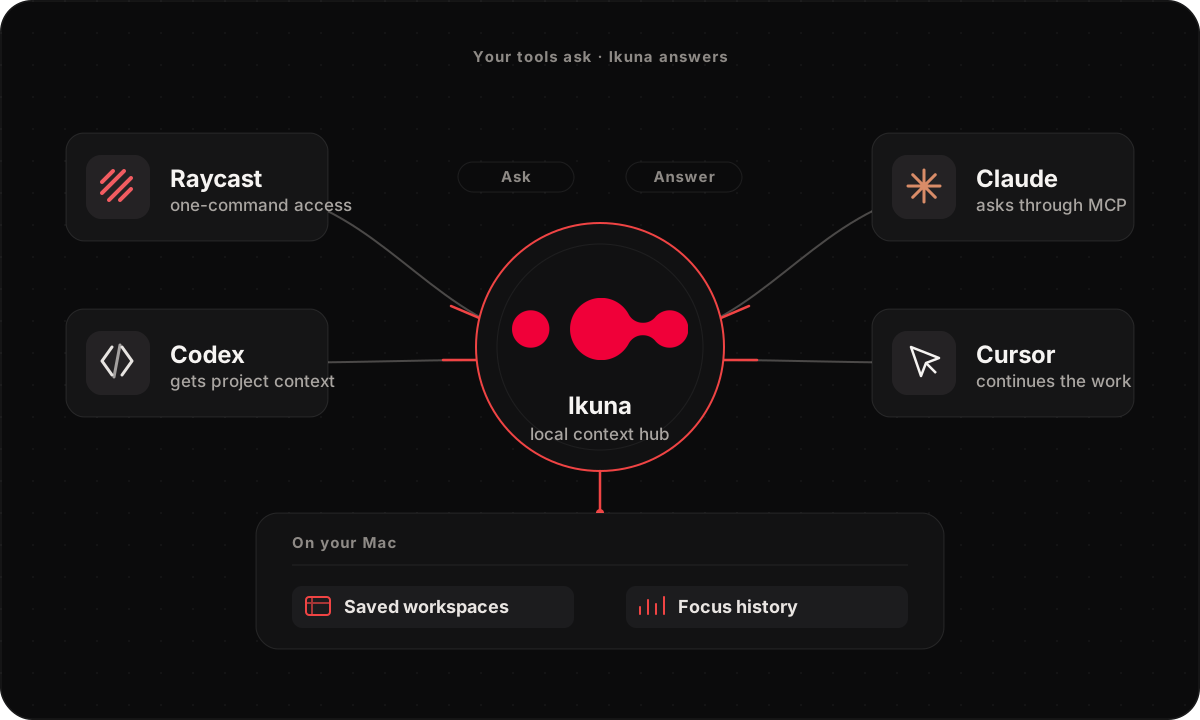
V1.2.6
MCP and Raycast
Ikuna 1.2.6 is the developer release. One npx command connects the AI tools you already use to Ikuna's local record of how you actually worked: sessions, focus blocks, and context switches, answered from data that stays on your Mac. A guided setup configures and repairs each client for you, and a new Raycast extension brings Ikuna Today, workspace switching, and saving to the keyboard. MCP stays optional: everything in Ikuna works without it.
One command connects your AI tools
- Run npx -y ikuna-mcp and Claude Desktop, Codex, Claude Code, or Cursor can ask Ikuna about your real work: what you worked on, for how long, and where your attention went.
- Guided setup finds each client's config and writes it for you with npx ikuna-mcp setup, backs up the old one, and verifies the connection live. Already set up? setup --repair finds and fixes what broke.
- Ikuna is listed on npm and the official MCP Registry, so install and updates stay one command, with nothing new to host.
- MCP stays optional. Ikuna works fully without it; the connection is there when your tools need your context.
Raycast: Ikuna Today and workspace control from the keyboard
- Ikuna Today shows today's Focus Score, the day's key numbers, and a 7-day trend, without opening the Dashboard.
- Switch, edit, save, reopen, or exit an Ikuna straight from Raycast, plus a jump into Focus Intelligence.
- The extension talks to Ikuna through the same signed local MCP bridge, so nothing new gets access to your data.
MCP answers get sharper
- Tools resolve an Ikuna by its exact identity, so a question about a specific workspace hits the right one.
- A timestamp-bounded raw activity export gives your agent a finer cut of the day when a summary is not enough.
- Read calls work with stricter MCP clients, so fewer 'works in one tool, fails in another' surprises.
Steadier where it counts
- An Opera or Chrome restore that times out, or gets replaced by a new switch, now stops cleanly instead of fighting the next one.
- Deep work survives a short idle break, and sleep ends a session cleanly instead of leaving a gap.
- Active Time and context-switch counts agree everywhere you see them: Dashboard, reports, and MCP.
- Workspace wallpaper activates reliably across multiple displays and follows you across machines.